Posts

Showing posts with the label Productivity

Blip Blip Plays Hourly Sounds Similar To Watches

Image
If you're someone who likes the hourly sounds that are made by watches or wall clocks every hour then you might show interest in an app like the Blip Blip. This app brings the hourly chimes feature to Android. The app is build by PaweÅ‚ Nadolski and is available for free in the Google Play Store with no In-app purchases. Blip Blip app has a simple UI and it notifies you every hour with a sound. Currently, the notification sounds have 6 variations and its creator mentioned there is more to come. In addition to the sound, you can also enable vibration. You can turn the app on off from its main screen. Once on, the notification repeats every hour or you can set for shorter times. You can check the upcoming notification times for almost a week and if you don't want the app to notify you in the night or any other specific time then you can set the silent time in settings. In addition to that, you can also add silent days. You can light up the screen during notification ...

To Round - Organize Tasks In Bubbles

Image
To Round is a task managing application that organizes your tasks in bubbles and these bubbles juggle when your phone is tilted. The app is offered by Future Comes and is available for free in the Google Play Store with no In-app purchases. Start creating tasks simply by adding the title. You can also add date, time to remind you, labels to differentiate your tasks and a detailed description of the task. The size of the bubble will help you realize the priority of the task. Bigger the size of the bubble the important the task is. Once you completed a task mark it as done. All your completed, postponed and current tasks can be viewed anytime. Great Day Readers! To give us more insights into the application development Anna Svirelkina, Marketing Expert at Future Comes responded with the answers. Here are the Q&A exclusive for our readers. 1. Tell us about the team? We are a highly talented team of experts, moreover, some of us have been working together for over ...

Mr Phone - Find The Next Best Phone You Want To Buy

Image
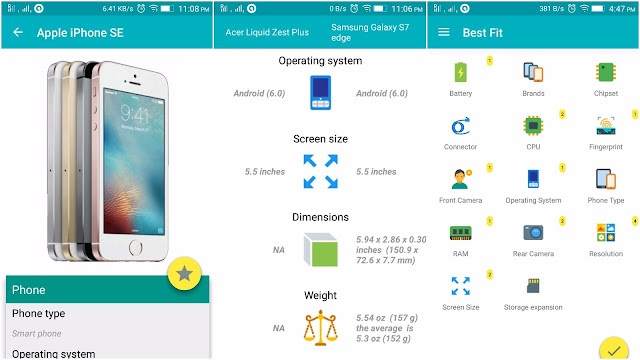
Want to buy a phone and not sure which phone to choose? Mr Phone is a phone search application and is here to help you find the best phone. The application was built by acidandrage and is available in the Google Play Store with In-app purchases. Search for your device and detailed specs gets loaded along with the image. You can tap the image for more pics or save the phone specs to view later. You can compare specs of any two phones or choose to use the Best Fit option. The Best Fit option of the app will show you the list of best-matched phones based on the preferred specs you've selected. Sections like New Releases and Popular shows the newly released phones and the phones that became most popular recently. While Stories section gives you to the Top Stories about smartphones, apps, and the Events section notifies you about the launch events of the smartphones. Great Day Readers! To give us more insights into the application development, Ashish Hooda...

OPTiM Cafe - A Screen Sharing Service to Replace Office Monitor or Projector

Image
If you regularly give presentations in the meeting rooms then you definitely know that sometimes it becomes difficult to set up the monitor and even though you know everything is right you just couldn't get it to work. This experience could be irritating and the negative start could be distracting. OPTiM Cafe is a screen sharing service that lets you share presentations with your team or client with ease and without the use of a monitor or projector. The application was built by OPTiM Corporation and is available for free in the Google Play Store with In-app purchases. Enter a number to start sharing the screen and others can join the presentation with this number. There is no need for installations or registrations. Once you purchase the subscription, the limited time of 15 minutes become unlimited. Great Day Readers! Noriko Iwata and Leslie James collaborated together to give us insights into the application development. Noriko Iwata is the head developer for OPTiM...

Todoist - The Only Task Managing App You Need

Image
Todoist is a task manager application that lets you create tasks, subtasks, add comments and set reminders. The application is offered by Doist and is available for free in the Google Play Store with In-app purchases. Creating a task can be as simple as writing the task to a more complex and detailed creation like setting the date and time, priority, project type. If you're a pro user you can set labels, reminders and add comments. Swipe right if you're done with the task or swipe left if you want to snooze it. The interesting feature that I liked is the way the app turns the text into date and time. If you type text like "tomorrow" or "every day at 7", the app converts the text into date and time. You can turn the task into a subtask if the task is a continuation of a previous task. You can create projects and sub-projects, Collaborate on shared tasks and get notified via notification, email or as an SMS if changes were made. Set up daily goa...

Chromer - A Custom In-app Browser for Your Apps

Image
Have you ever clicked a link in your application that opened an in-app browser showing you a login screen or a form to fill? Were these details already saved in your Chrome? Did you felt like it is a time-consuming and irritating experience to enter these details again and again in every app? Well, I did and many others like me. Google came up with a solution, called it Chrome custom tabs. The only prevailing issue is that not all applications implemented this feature and you might be still facing the above issue in your application. Chromer overcomes this issue. Chromer is a light-weight custom in-app browser for all your apps and implements Chrome custom tabs. The application is designed by Arun Kumar and is available for free in the Google Play Store. Set Chromer as your default browser and now all the apps are forced to ditch their in-app browser in favor of using Chrome custom tabs. If you are already logged into a website on Chrome, you don't have to log in again. ...

Filter Apps from Games in the Play Store Top Charts

Image
Apps - Play Store Link is a lightweight application that lets users see the top charts apps without interference from the games. The app is provided by Happening Studios and is available for Free in the Google Play Store. Apps - Play Store Link takes use of a hidden link in the Play Store to display the apps in the Top Charts. This is a very helpful application for those who are interested in seeing only apps in the apps Top charts and don't like to scroll through endless games. I don't understand why Google shows games in the apps section even though it has dedicated a section for games. You can see the image below where the Play Store Apps Top Chart is overpopulated with games and the Apps - Play Store Link show just the apps.

Clipboard Actions to create appropriate actions based on the clip

Image
Clipboard Actions creates appropriate actions based on the clipboard and display them in the notification bar. This application is provided by Halfreal Games. The user can search the copied clip in Google, Bing, Baidu or couple other search engines based on the preferences set in the settings. If the clip is in another language, then the user can translate it to the preferred language which can also be changed in the settings. The user can share the clip or create a QR code directly from the notification area and if the copied text is an address then it can be searched on Maps directly. Clipboard Actions shows meaning in the notification bar when individual words are copied. It converts currencies too but the conversions open the browser to display the value. It would be amazing if it displayed the conversion value directly in the notification bar. Also, the currencies symbol has to be written next to the number to get recognized. If the users copy texts like 4 euros or ...