Add Options Menu to Activity and Fragment
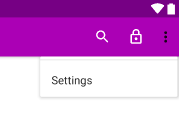
Options Menu contains a set of primary menu items that are accessible to the user. In this article, we will take a look at how to implement the options menu in an Android Activity or a Fragment. Right click on the res directory in Android Studio and select Android Resource File option. It opens the Resource File creation modal where we need to enter the file name and select Resource Type as Menu. Clicking on OK button creates main_menu.xml under menu directory. Now add the following items to the XML file. <menu xmlns:android="http://schemas.android.com/apk/res/android" xmlns:app="http://schemas.android.com/apk/res-auto"> <item android:id="@+id/search" android:icon="@drawable/ic_search_white" android:orderInCategory="100" android:title="@string/action_title_search" app:actionViewClass="androidx.appcompat.widget.SearchView" app:showAsAction="ifRoo...